NEW - ISO 27001 Certification and ONNX and Triton Blueprints for Accelerated Inference
Share insights, seek advice, or simply connect with fellow members on topics that matter to you.
Recently active
Google researchers have unveiled GameNGen, a groundbreaking game engine entirely driven by AI that can simulate intricate video games in real-time. This innovative technology was showcased by recreating the iconic first-person shooter, Doom.GameNGen employs a neural network to generate game frames at more than 20 frames per second, creating visuals that closely mirror the original game. The AI model underwent a two-phase training process: initially, an AI agent was taught to play Doom, followed by training a separate model to predict the next frame based on previous actions and frames.“We introduce GameNGen, the first game engine entirely powered by a neural network, capable of real-time interaction within a complex environment over extended periods and at high quality,” the researchers detailed in their paper.This technology holds the potential to revolutionize game development by enabling the creation and modification of games through text descriptions or example images, moving away
Hi everyone,I’m using an HP laptop and recently noticed that the fan has started getting much louder, especially during normal tasks like browsing or watching videos. This started after a recent Windows/HP update.I’ve already checked for dust and updated drivers through HP Support Assistant, but the issue is still there.Has anyone else experienced this? Is this a software issue or something I should be concerned about?Any suggestions would be appreciated. Thanks!
Hi everyone,We’re using HP AI Studio and Z by HP workstations for local and hybrid AI development, and as our workloads grow, we’re collaborating with remote data scientists and ML engineers across different time zones.For teams working this way, how do you typically handle: Project ownership and handoffs in HP AI Studio Environment consistency (packages, configs, datasets) across local and remote contributors Secure access to models, experiments, and compute resources on Z workstations or ZGX systems We’re exploring support from a remote recruitment agency like CrewBloom to scale specialized AI talent, and I’m curious how others ensure smooth collaboration and governance when contributors aren’t in-house.Would love to hear best practices or lessons learned from teams running distributed AI workflows on HP’s AI stack.Thanks in advance!
Hi all,After spending hours building models, crunching numbers, and staring at charts, my brain often starts lagging before my code does. So I’ve started sprinkling in micro-breaks with light browser games to reset focus without going full distraction mode.What I look for in a break game:Very short play sessions (2-5 minutes max)Minimal loading / instant playLow cognitive demand — nothing that requires full focusVisual simplicity (so it doesn’t blast your eyes after numbers)Some games I’ve tried: memory match (flip tiles), pattern sequence puzzles, quick logic challenges. Even just a minute or two helps me come back to modelling with fresher perspective.I’d love to hear:Do you do the same?Which browser games (or micro-games) have you found particularly helpful during long data/modeling sessions?
HP’s Andrew Hawthorn joins the Intelligent Machines team to talk private AI and Edge AI super computers. Check out the show. Let us know what you think… Intelligent Machine is a part of TWiT.tv is a technology podcasting network located in the San Francisco Bay Area with the #1 ranked technology podcast This Week in Tech hosted by Leo Laporte. Every week we produce dozens of hours of content on a variety of programs including Tech News Weekly, MacBreak Weekly, Windows Weekly, Security Now, Intelligent Machines, and more.Follow Intelligent Machines: Website: https://twit.tv/ Bluesky: https://bsky.app/profile/twit.tv Mastodon: https://mastodon.social/@TWiT Facebook: / twitnetwork Instagram: / twit.tv X (Twitter): https://x.com/TWiT TikTok: / twittok LinkedIn: / twit-llc
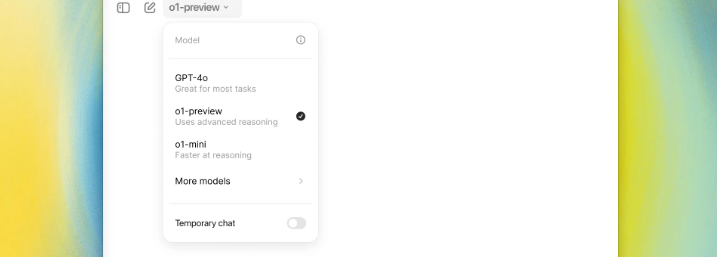
OpenAI has announced the release of its latest AI model, codenamed Strawberry, now officially named OpenAI o1. This new model is designed to improve how AI handles complex tasks in math, science, and coding by evaluating its steps before providing a response.Key Updates: Advanced Reasoning: Unlike previous models, OpenAI o1 takes more time to think through problems, emulating a more human-like reasoning process. This approach helps the model better handle difficult questions and adhere more closely to safety guidelines. New Naming and Features: OpenAI o1 introduces a new naming system and will be available alongside existing models like GPT-4o. There’s also a lightweight variant, o1-mini, focused on code generation. Rolling Out Access: The new model is being introduced in phases. Starting today, ChatGPT Plus and Team users will get limited access to both o1-preview and o1-mini, with educational and enterprise users gaining access next week. Current Limitations: While promising, O
HP is working to help users get a head start on customizing AI models with open-source AI blueprints available to anyone on Github. Search “Github AI blueprints” on Google or Chat-GPT to quickly find links to HP AI Blueprints for a variety of AI use cases on Github or visit Github directly: https://github.com/HPInc/AI-Blueprints.Happy coding!
Our data science team requires specialized expertise for HP AI Studio implementation and enterprise AI development optimization. We're seeking an experienced consultant with 1-2 weeks availability to support us with:Configuring comprehensive on-premises AI development workflows using HP AI Studio blueprints and workspace management Implementing secure model training and deployment pipelines leveraging NVIDIA NGC catalog integration and custom container environments Establishing collaborative data science projects with MLflow tracking, artifact management, and team-based workspace sharing Optimizing GPU utilization and compute resource allocation for TensorFlow, PyTorch, and custom AI model development Training data science teams on platform best practices, blueprint customization, and end-to-end AI project lifecycle managementOur enterprise organization aims to deploy secure, on-premises AI capabilities while maintaining data privacy and leveraging HP's integrated hardware-software eco
I tried a few free AI tools to prototype small local models. Some outputs were useful, others sounded like a motivational coach I didn’t ask for.Has anyone else tested these? Did it actually help, or just add extra comedy to your workflow?
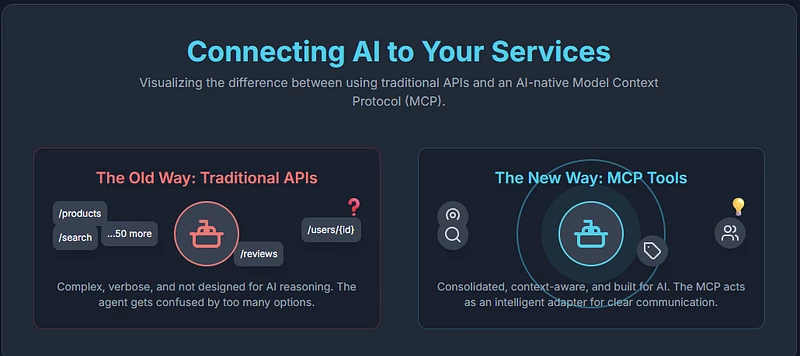
Image generated using Gemini CanvaThe Hidden Challenge of Connecting AI to Your ServicesPicture this: You’ve built a fantastic API that powers your application. It’s well-documented, follows REST principles, and serves thousands of requests daily. Now, with AI agents becoming mainstream, you’re excited to make it available to LLMs through the Model Context Protocol (MCP). There’s even a tool that can auto-convert into an MCP server. What could go wrong?As it turns out, quite a lot.The rush to make existing APIs available to AI agents reveals a fundamental mismatch: APIs designed for traditional software weren’t built with AI’s unique constraints and capabilities in mind. Let’s explore why simply converting your API into an MCP tool might be setting your AI integration up for failure.Understanding the Players: Agents, Tools, and MCPBefore diving into the problems, let’s establish our terminology. In the AI ecosystem:Agents are LLMs that can take actions beyond just generating text Tool
Image credit — GPT-5: What’s New in OpenAI’s Latest ChatGPT Model? | Built InThe buzzword in the AI for this week is GPT — 5, while there are mixed reviews about the model itself, the conversation is shifting from sheer performance benchmarks to critical questions of reliability and trust. For anyone who uses large language models (LLMs) regularly, their flaws — confident hallucinations, sycophantic agreement, and unhelpful refusals — are all too familiar.OpenAI’s flagship model isn’t just about getting bigger; it’s about getting smarter, safer, and more honest. Based on recent explainers, GPT-5 is being engineered with five targeted improvements designed to address these persistent issues. Here’s a practical, theory-grounded tour of what those changes are and why they represent a crucial step toward AI we can actually trust.Understanding the Core FlawsBefore diving into the solutions, it’s important to understand the problems. Here’s a quick breakdown of the key issues GPT-5 is desig
Anbu Valluvan, AI Engineer at SQOR.ai, shared his perspective on TOPS as a metric and why HP ZGX Nano AI Station with NVIDIA GB10 Grace Blackwell technology offer a powerful way to transform high TOPS into usable AI performance. TOPS (Tera Operations Per Second) measures how many trillion operations a processor can execute each second, making it a popular shorthand for AI compute power. Higher TOPS generally means faster training and inference, especially for large models. However, TOPS reflects ideal peak performance, not always what workloads achieve in practice. Real results depend on factors like memory bandwidth, architecture efficiency, and sustained thermal performance. The HP ZGX Nano AI Station will deliver ~1,000 TOPS in a desktop-friendly form factor—enough to run massive language models locally. Unified CPU-GPU memory and NVLink connectivity keep data flowing to the compute units, helping workloads achieve closer-to-peak performance. Energy-efficient Grace CPUs and robust
The past few years have seen an exponential growth of AI applications, from generative models with hundreds of billions of parameters to real-time vision systems. This explosion in AI capability drives an equally intense demand for computing power. In response, hardware vendors have adopted metrics like TOPS (Tera Operations Per Second) to rate AI acceleration.TOPS indicates how many trillions of operations a processor can perform each second under ideal conditions. It has become a key benchmark for comparing AI chips. A higher TOPS suggests the ability to process more data or larger models in the same time frame – critical when training massive neural networks or running complex inference workloads. Yet, as useful as TOPS is, it’s not a simple race for the highest number. Other factors (like memory and efficiency) affect real-world performance, and HP’s ZGX systems illustrate how TOPS is a powerful but nuanced metric.In this article, I’ll break down what TOPS really means, how HP ZGX
What is the good way to describe what RAG does to non-technical SMB customers?
AI Engineers are knee deep in numbers. This is a quick poll to ask...”do you numpad”?
🚀 We’re excited to announce the winners of the HP & NVIDIA Developer Challenge!🏆 1st Place – AffectLinkAffectLink brings real-time multimodal emotion analysis to telehealth using HP AI Studio—helping clinicians uncover hidden cues and improve patient outcomes.🥈 2nd Place – Document Analysis ToolsetThis powerful toolkit uses custom-trained vision models to analyze PDFs, detect forgery, extract signatures, and track document version history.🥉 3rd Place – Mira3DMira3D transforms your surroundings into immersive 3D scenes using AI-powered Gaussian splatting.👏 Huge thanks to all participants and judges for your incredible contributions and creativity! Check out the full gallery of submissions here: https://hpaistudio.devpost.com/project-gallery
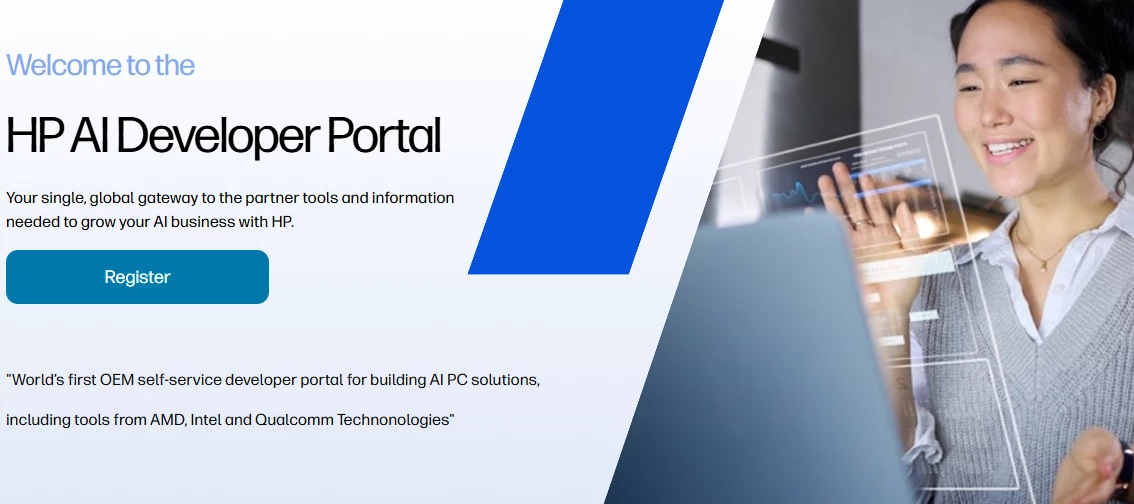
👉 Join the HP AI PC Developer PortalUnlock access to tools, resources, and a growing network of innovators—all designed to support your AI development journey.🛠️Accelerate your work with cutting-edge solutions from HP partners like Intel, AMD, and NVIDIA. 📄 White papers and technical articles to deepen your expertise 🧠 Fresh AI content and insights 🤝 A growing community of innovators like you
Kicking off April 7th, HP and NVIDIA are launching an AI hackathon where developers, researchers, and innovators can build open-source AI solutions with real-world impact. Whether you're optimizing models, enhancing workflows, or creating entirely new applications, this is your opportunity to push AI development forward in a high-performance local environment.Who Can Participate?Open to U.S. participants only Limited to 1,000 accounts on HP AI StudioWhy Use HP AI Studio?HP AI Studio is designed for local AI development, providing:Secure, containerized workspaces Pre-configured environments for quick setup Seamless integration with NVIDIA NGC libraries High-performance on-prem AI workflows—no cloud dependenciesWith HP AI Studio, you get maximum performance, security, and flexibility for your AI projects. How to JoinFor details on hackathon rules, prizes, and to sign up, click here: hpaistudio.devpost.comHead over to our Hackathon page for more info about the Devpost hackathon.
This week’s HP & NVIDIA Developer Challenge Office Hours gave participants a chance to ask questions, troubleshoot roadblocks, and share ideas as we head into the final stretch of the hackathon. Here's a quick recap of what came up:🛠️ Project Collaboration & SetupOne common hurdle: collaborating with teammates in AI Studio. By default, accounts are set up with one seat—but that’s not a hard limit. The team confirmed that if you email aistudio.support@hp.com, they can manually add a collaborator so your teammate can join your project.Another hot topic was installation and compatibility. Participants asked about running AI Studio on services like RunPod and Linux-based systems. While not officially supported yet, the team encouraged folks to try installing the Linux version on Ubuntu 22.04 and share feedback. There’s even a helpful download and setup guide shared during the call.🚀 Running AI Studio Without a GPUA few users asked if AI Studio can run without an NVIDIA GPU. The s
The Installation Guide covers:What AI Studio is and the basic installation process for both Windows and Ubuntu The system requirements needed before starting the installation What to expect after installation and how to get startedHave questions? Drop a comment below!Learn more about AI Studio here and see how Z by HP powers Data Science & AI Solutions.
Thanks to everyone who joined this week’s Devpost webinar and office hours. We had a great session led by Rick Jacobs, who demonstrated how to build and deploy a tourism recommendation system using BERT in AI Studio. The discussion covered key features of the platform, tips for working without a GPU, and clarified project submission requirements. Below is a summary of what was covered and shared during the session.Live Demo: Tourism Recommendation System in AI StudioPresented by Rick Jacobs, the session featured a walkthrough of building a semantic search recommendation system using a BERT model from the NVIDIA NGC catalog. The demo included: Generating embeddings from a corpus using a pre-trained BERT model Deploying the model with MLflow for tracking Serving the system locally with Swagger UI for testing Key Features of AI Studio HighlightedPreconfigured environments and containerized workflows Support for custom models and datasets Built-in deployment tools including MLflow
General Updates & Reminders Developers were encouraged to share 30-second project videos or screenshots in the Discord announcements channel. Use the AI Studio support tab to submit tickets and logs for technical help. Use the Send Feedback feature in AI Studio to share product improvement ideas. 🔍 Key Questions Answered Is it too late to join the hackathon? ➤ No. There's about one month left, and it's possible to submit a solid project within that time. Can I submit a localhost project? ➤ Yes, as long as the GitHub repo is public and includes setup instructions. Hosting on a live site is optional but earns bonus points. Are some industry categories prioritized? ➤ No. All industries are equal; stronger, more impactful use cases will be favored regardless of sector. Tech Stack Clarification: ➤ React, Node.js, C++, and other stacks are allowed. A React-based UI example was shared via GitHub. Troubleshooting TensorFlow/Nemo issues in AI Studio: ➤ Could be due to image or
MLflow Model Monitoring OverviewThis tutorial project implements a model monitoring and experiment tracking system using MLflow. The system enables data scientists and ML engineers to track, compare, and deploy machine learning models with full versioning and performance monitoring capabilities. FeaturesExperiment Tracking: Record and compare different model runs with detailed metrics and parameters Model Versioning: Maintain a complete history of model iterations with MLflow's Model Registry Performance Monitoring: Track key metrics like accuracy, response time, and similarity scores Parameter Logging: Automatically record all model parameters and configurations AI Studio with MLflow Benefits for ML ProjectsExperiment Organization: Structured tracking of all model iterations and experiments Reproducibility: Complete environment and parameter tracking ensures reproducible results Collaboration: Team members can easily share and compare experiments Model Lifecycle Management: Streamlin
AI Studio Troubleshooting Guide Getting Started Issues Issue: Unable to create an account Solution: Check if you're using a supported email domain Clear browser cache and cookies Try a different browser Ensure you have a stable internet connection If corporate email, check with IT about firewall restrictions Issue: Can't access dashboard after login Solution: Verify you're using the correct login credentials Check if your account has been properly activated Clear browser cache and try incognito mode Disable browser extensions that might interfere Contact support if issue persists Connection Problems Issue: Frequent disconnections during sessions Solution: Check your internet connection stability Close unused browser tabs to free up resources Try a wired connection instead of Wi-Fi if possible Clear browser cache and restart Check if your VPN is causing interference Issue: API endpoints unreachable Solution: Verify the correct endpoint URLs in your reques
This week’s Office Hours was hosted by Sothan Thach and supported by Christian Charles and Suresh Ramanan from HP. It provided live technical help and guidance for participants in the DevPost Hackathon, particularly those using HP AI Studio.Summary AI Studio Compatibility & Setup AI Studio currently supports Windows 10/11 and Ubuntu 22.04 LTS only. Running on Ubuntu 24.04 or VMs (VirtualBox, WSL, etc.) may cause issues; such configurations are not officially supported. Using GitHub Sample Projects Suresh gave a full walkthrough on how to clone and load projects from GitHub into AI Studio. He highlighted the value of the vacation-recommendation sample and showed how to run notebooks inside the correct AI Studio kernel. Hardware Requirements A GPU is needed; using platforms like Google Colab is not supported. Minimum specs: ~16GB RAM, compatible NVIDIA GPU. RAM needs may vary depending on model size (e.g., 1B parameters ≈ 1GB GPU memory). Gett
Already have an account? Login
Enter your E-mail address. We'll send you an e-mail with instructions to reset your password.