NEW - ISO 27001 Certification and ONNX and Triton Blueprints for Accelerated Inference
A central space for sharing insights, connecting with peers, and building community around AI and data science.
Recently active
AI Studio Release: v1.58.2 Released Lots of updates, fixes, and performance improvements to check out. Update or Download to TrySome items you will see:4 updated blueprints now ready to create ONNX files and host on Triton Model Service with a click of a button to speed up local inference of hosted blueprint models. Check them out: classification-with-keras agentic-rag-with-tensorrtllm audio-translation-with-nemo vacation-recommendation-with-bert ISO 27001 Certification Sign-up link for users who download without signing-up first Preconfigured WSL Distro MLFlow and Tensorboard images confirmation enables dependent features Model, Dataset, and Image download status indicators Enhanced error messaging and resolution documentationRelease notes
We’re doing exploratory research on how AI teams actually run scaled workloads. Want to contribute? Our team at HP is running a short, self‑guided AI‑moderated interview to better understand how teams approach AI development, model training, and production inference—and where today’s compute setups fall short. We’re especially interested in AI/ML engineers, data scientists, MLOps or platform engineers working with GPUs. If your use cases align, you can also opt in to be considered for future lighthouse collaboration. What to expect: ✅ ~15–20 minutes ✅ No scheduling — complete it anytime Take the interview here: 👉 https://tinyurl.com/hpincai
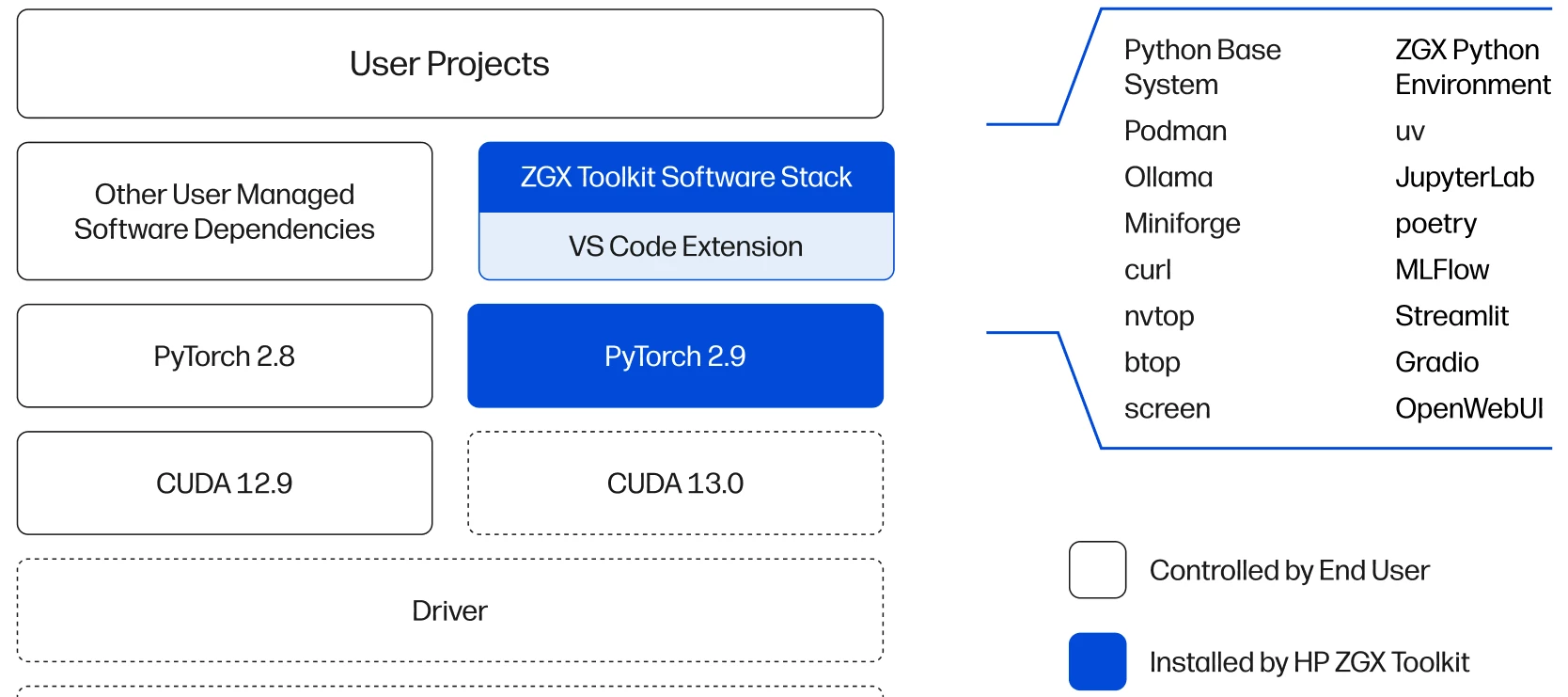
Today HP released the ZGX Toolkit, a VS Code Extension that streamlines AI development workflows on HP ZGX desktop AI supercomputers by providing automated setup of essential open-source AI tools and seamless device discovery on your LAN. Discover, set-up, and start using a ZGX as an AI companion to unlock the compute your workflows need.With the ZGX Toolkit now you can:discover and connect ZGX devices on your network; no manual IP / SSH set-up quickly install popular open source AI packages and apps, including dependencies leverage templates to quickly test prototype and fine-tuning on your ZGX deviceThe toolkit is free and can be installed directly from the VS Code Marketplace. Check out this 1 min video to see how.For more information, visit www.hp.com/zgx-onbard.
Hello, I have a HP ProDesk 400 G6 MT and I want to upgrade with a RTX 3060 Ti graphic card, it is possible?My power suply is 250 watts. Please help me. Thank you.
I’m using an HP Spectre x360 16 with 32GB RAM and a 1TB SSD for Python development, Jupyter Notebook projects, audio processing, and data analysis. Lately, I’ve noticed that during heavier workloads, the laptop heats up significantly and experiences noticeable performance lag. Browser-based apps, online games, and even lightweight websites sometimes freeze or slow down when the temperature rises.Interestingly, some sites run without any lag at all—for example, the Rice Purity Test for Couples works perfectly even when other apps are struggling.The overheating and lag usually appear when:Running Python libraries or processing large datasets Multitasking with multiple browsers and development tools Using resource-intensive web appsCPU usage spikes quickly, fans get loud, and performance still drops after a while. I’m trying to figure out whether this is mainly due to:Thermal or cooling limitations CPU throttling from heat Aging thermal paste or dust buildup Windows power or performance s
We hear the phrase "AI workflow" thrown around constantly. It sounds incredibly fancy, like something happening in a high-tech lab with glowing blue screens. But if you strip away the buzzwords, an AI workflow isn't magic. It’s just a step-by-step recipe for turning raw data into smart decisions. Whether you are building a massive LLM or just trying to get a model to predict house prices, the core workflow almost always follows the same basic journey. If you're new to the community, here is the plain-English breakdown of how AI actually gets made: 1. The "Data Clean-Up" Phase (Data Prep) Before a chef cooks, they wash and chop the ingredients. AI is no different. Computers can’t learn from messy, missing, or chaotic data. What it actually is: Cleaning up spreadsheets, organizing images, fixing typos, and getting everything into a format the computer can actually read. The reality: Ask any data scientist - this is usually 70% to 80% of the entire job! 2. The "Practice Exam" Phase (M
I am facing overheating and performance lag issues while running data science tasks on my laptop. When using tools like Jupyter Notebook, Python libraries, or large datasets, the system temperature rises quickly and the laptop becomes very slow. Sometimes applications same as web apps like when i play games online like letterboxed it freeze or crash, which interrupts my workflow. I would like to know if this is a hardware limitation, cooling issue, or if there are recommended performance optimization settings for better stability.
I am using an HP ZBook 15 G4 with 48GB RAM and a 512GB NVMe SSD, mainly for Python development, Jupyter Notebook work, and Morse code translation, audio processing projects. Despite the RAM upgrade, the laptop heats up heavily during workloads and sometimes becomes slow or unresponsive. In some cases, browser-based apps or lightweight online games freeze or crash when the temperature rises.The overheating usually starts when running Python libraries, processing larger datasets, or multitasking with browsers and development tools together. CPU usage spikes quickly and the fans become very loud, but performance still drops after some time. Since the storage and RAM are already upgraded, I want to understand whether this is mainly:a thermal/cooling problem, CPU throttling due to heat, aging thermal paste or dust buildup, power/performance configuration in Windows, or simply a hardware limitation of the laptop under sustained workloads.I would also appreciate recommendations for improving
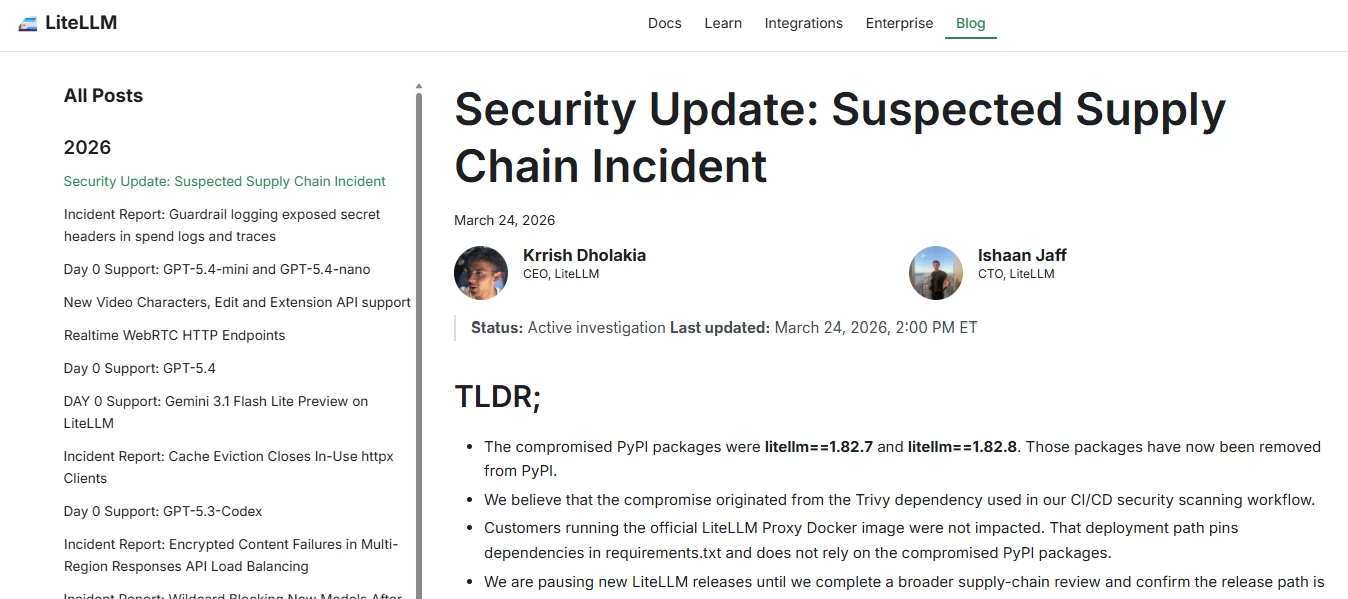
Supply-chain compromise of LiteLLMSupply-chain compromise of LiteLLMAn attacker hijacked maintainer credentials via poisoned CI dependency, published legit-package backdoors with auto-executing infostealer (.pth) exfiltrating cloud, SSH, K8s, and crypto secrets, plus persistence/C2.According to LiteLLM only PyPI versions 1.82.7/1.82.8 had malicious packages, injected via compromised CI (Trivy). Official Docker image (pinned deps) unaffected; releases paused during audit. Malware enabled full credential exfiltration and persistence.LiteLLM’s guidance: Uninstall affected versions (1.82.7/1.82.8) and reinstall a safe version (≤1.82.6) Rotate all credentials (cloud, API keys, SSH, etc.) immediately Audit systems/CI for compromise & persistence (hosts, containers, clusters) Pause/secure release pipelines and review supply chain (CI/CD, dependencies) Prefer pinned/isolated deployments (e.g., Docker with locked deps)
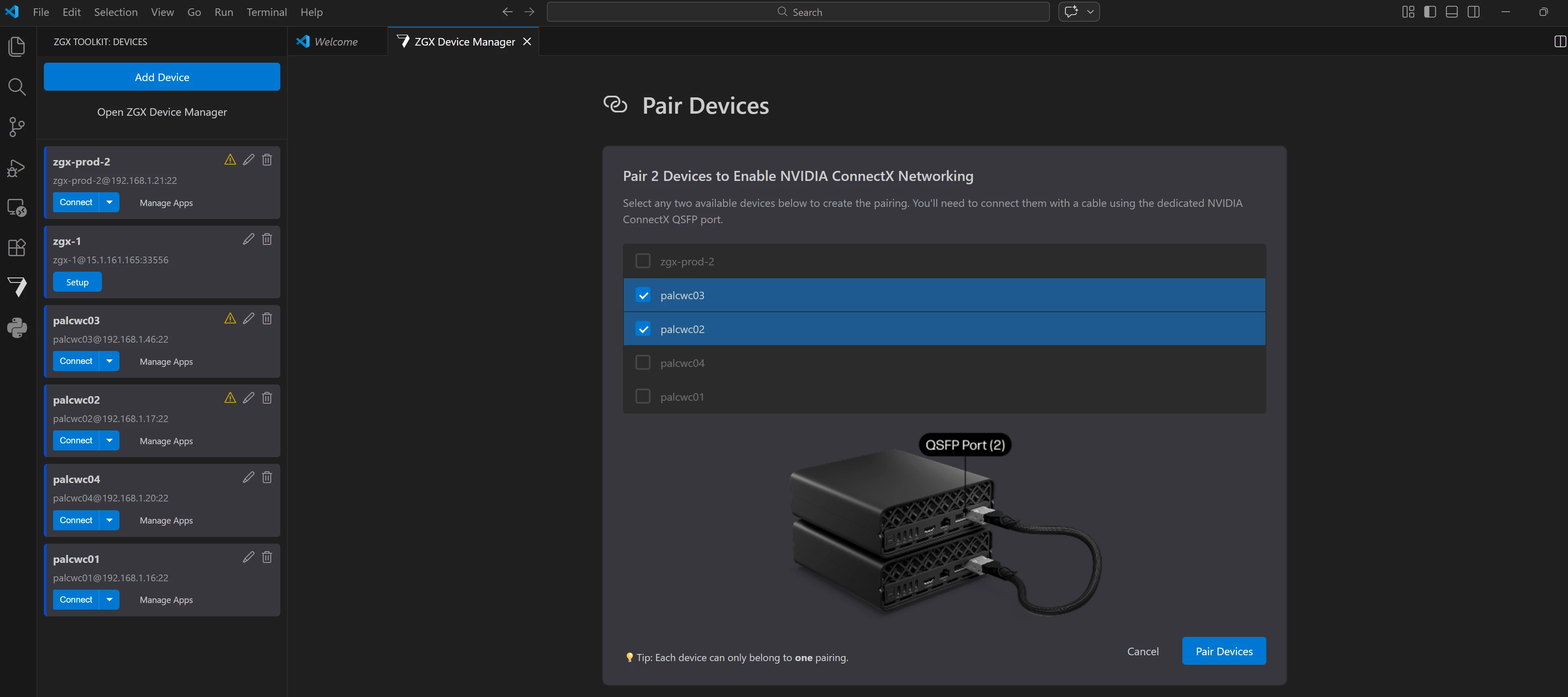
HP released v1.21.1 of the ZGX Toolkit VS Code Extension (AKA: ZTK). What's NewThis release introduces ConnectX device pairing, enabling two ZGX Nano devices to be linked together for highperformance networking over ConnectX NICs—all managed directly from VS Code. The release also includes bug fixes and UX and RAG template improvements. It also delivers UX polish, a more capable RAG sample, and a collection of bug fixes. Major FeaturesConnectX Device PairingYou can now pair two ZGX Nano devices to form a high bandwidth ConnectX network link. Once two devices are physically connected using a QSFP cable, the ZTK extension helps with a clean UI for everything else. The entire pairing workflow—selecting devices, entering credentials, configuring NICs, and monitoring the result—is handled within the extension. What's included:ConnectX NIC Configuration – SSHbased configuration and unconfiguration of ConnectX NICs is wired into the group service, with centralized SSH connection utilities sha
Recent AI news you can use: 1. Chinese AI lab DeepSeek withholds its new flagship model from US chipmakers. (Investing.com)2. Thomson Reuters stock surges after Anthropic praises Co-Counsel legal AI tool. (Bloomberg.com)3. Europe’s Wayve becomes one of the continent’s most valuable AI firms. (Cybernews)4. Google updates Gemini AI across Gmail, Chrome, and learning tools. (blog.google)5. Genesys shifts Enterprise LLMs to LAMs (large action models). (Forbes)6. Advanced robotics and AI research from DeepMind continue expanding capabilities. (Wikipedia)7. India unveils new large language models and multimodal AI at 2026 summit. (Wikipedia) 8. AI reads brain MRIs in seconds to flag emergencies. (ScienceDaily)
Hi everyone,I’m using an HP laptop and recently noticed that the fan has started getting much louder, especially during normal tasks like browsing or watching videos. This started after a recent Windows/HP update.I’ve already checked for dust and updated drivers through HP Support Assistant, but the issue is still there.Has anyone else experienced this? Is this a software issue or something I should be concerned about?Any suggestions would be appreciated. Thanks!
Hi everyone,We’re using HP AI Studio and Z by HP workstations for local and hybrid AI development, and as our workloads grow, we’re collaborating with remote data scientists and ML engineers across different time zones.For teams working this way, how do you typically handle: Project ownership and handoffs in HP AI Studio Environment consistency (packages, configs, datasets) across local and remote contributors Secure access to models, experiments, and compute resources on Z workstations or ZGX systems We’re exploring support from a remote recruitment agency like CrewBloom to scale specialized AI talent, and I’m curious how others ensure smooth collaboration and governance when contributors aren’t in-house.Would love to hear best practices or lessons learned from teams running distributed AI workflows on HP’s AI stack.Thanks in advance!
Hi all,After spending hours building models, crunching numbers, and staring at charts, my brain often starts lagging before my code does. So I’ve started sprinkling in micro-breaks with light browser games to reset focus without going full distraction mode.What I look for in a break game:Very short play sessions (2-5 minutes max)Minimal loading / instant playLow cognitive demand — nothing that requires full focusVisual simplicity (so it doesn’t blast your eyes after numbers)Some games I’ve tried: memory match (flip tiles), pattern sequence puzzles, quick logic challenges. Even just a minute or two helps me come back to modelling with fresher perspective.I’d love to hear:Do you do the same?Which browser games (or micro-games) have you found particularly helpful during long data/modeling sessions?
Our data science team requires specialized expertise for HP AI Studio implementation and enterprise AI development optimization. We're seeking an experienced consultant with 1-2 weeks availability to support us with:Configuring comprehensive on-premises AI development workflows using HP AI Studio blueprints and workspace management Implementing secure model training and deployment pipelines leveraging NVIDIA NGC catalog integration and custom container environments Establishing collaborative data science projects with MLflow tracking, artifact management, and team-based workspace sharing Optimizing GPU utilization and compute resource allocation for TensorFlow, PyTorch, and custom AI model development Training data science teams on platform best practices, blueprint customization, and end-to-end AI project lifecycle managementOur enterprise organization aims to deploy secure, on-premises AI capabilities while maintaining data privacy and leveraging HP's integrated hardware-software eco
What is the good way to describe what RAG does to non-technical SMB customers?
AI Engineers are knee deep in numbers. This is a quick poll to ask...”do you numpad”?
🚀 We’re excited to announce the winners of the HP & NVIDIA Developer Challenge!🏆 1st Place – AffectLinkAffectLink brings real-time multimodal emotion analysis to telehealth using HP AI Studio—helping clinicians uncover hidden cues and improve patient outcomes.🥈 2nd Place – Document Analysis ToolsetThis powerful toolkit uses custom-trained vision models to analyze PDFs, detect forgery, extract signatures, and track document version history.🥉 3rd Place – Mira3DMira3D transforms your surroundings into immersive 3D scenes using AI-powered Gaussian splatting.👏 Huge thanks to all participants and judges for your incredible contributions and creativity! Check out the full gallery of submissions here: https://hpaistudio.devpost.com/project-gallery
👉 Join the HP AI PC Developer PortalUnlock access to tools, resources, and a growing network of innovators—all designed to support your AI development journey.🛠️Accelerate your work with cutting-edge solutions from HP partners like Intel, AMD, and NVIDIA. 📄 White papers and technical articles to deepen your expertise 🧠 Fresh AI content and insights 🤝 A growing community of innovators like you
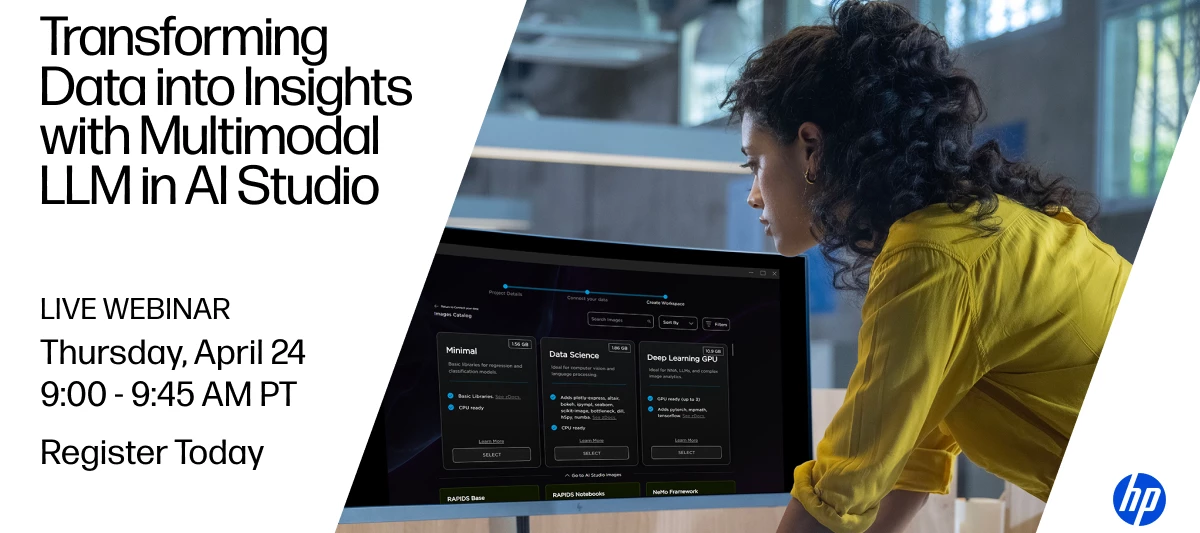
Working with diverse medical data like text, images, and audio can be challenging when trying to extract meaningful insights. In this webinar, Javier Hernandez, a Data Engineer, and AI researcher will share how multimodal large language models in HP’s AI Studio can help you integrate and analyze these different data formats more effectively.We’ll discuss how to create a real-world application, its challenges, and how HP’s AI Studio can transform medical research and diagnostics. Whether you’re new to multimodal analysis or looking to enhance your current methods, this session will provide valuable strategies for making better data-driven decisions.Join us to learn how to supercharge your workflows. Space is limited - register now to secure your spot!Topic: Transforming Data into Insights with Multimodal LLMs in AI StudioSpeaker: Javier Hernandez, Data Engineer & AI ResearcherDate & time: April 24th | 9:00-9:45am PT Register here: https://reinvent.hp.com/ai-studio-apr24
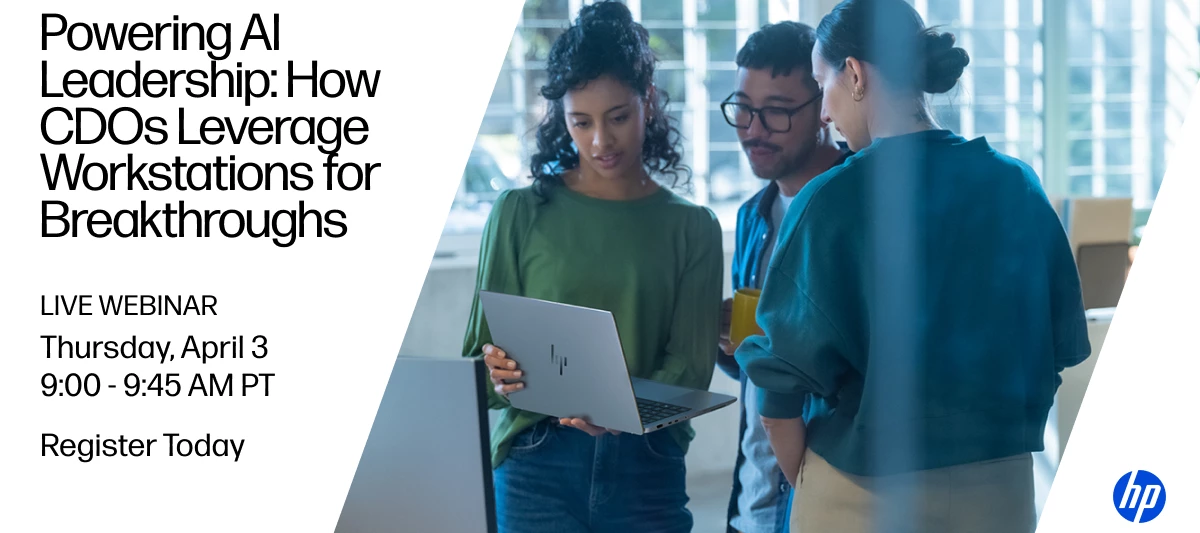
Join us for an exclusive conversation with Firat Gonen, Chief Data Officer at Figopara, as he shares how today’s data leaders are blending strategic vision with hands-on technical work to deliver real business results.Firat will walk us through his approach to building a strong data strategy, staying technically involved, and using high-performance workstations to support data-driven decision-making—especially when cloud isn’t always an option.🗓️ Date: April 3rd⏰ Time: 9:00 – 10:00am PST🎙️ Hosted by: Matthew Ireland, Senior Sales Manager – AI Software and Solutions at HP🔗 Register here: https://reinvent.hp.com/firesidechat-Apr3Here’s what you’ll get out of it:How modern data leaders balance executive goals with technical execution Why on-prem HP Z workstations are essential when cloud use is restricted Real ways to apply GenAI, LLMs, and ML models for business impact How the right hardware can unlock the full potential of your AI and data science work
HP & NVIDIA AI Influencer Event at NVIDIA GTC 2025When: March 19, 2025 | 7:30 PM – 9:30 PM PDTWhere: Loft Bar & Bistro - Dining Room, San Jose, CAEngage with top AI influencers Discuss cutting-edge AI trends Expand your industry connectionsSecure your spot! https://register.nvidia.com/flow/nvidia/gtcs25/se73345/form/rsvp
Cre[AI]tion, co-founded by Z by HP Ambassador Nik Dorndorf, is transforming the design landscape by connecting creators with AI tools that enhance creativity and streamline workflows. Acting as a "digital muse," Cre[AI]tion helps designers access advanced AI models and develop custom solutions tailored to their needs.With the power of Z by HP workstations, they’re driving innovation—accelerating model training, optimizing creative processes, and enabling groundbreaking projects. These high-performance workstations are a key part of how Cre[AI]tion supports creators in pushing the boundaries of what’s possible.Explore their case study to see how they’re shaping the future of design.
Google announced its Willow project with amazing claims on performance capabilities.
Already have an account? Login
Enter your E-mail address. We'll send you an e-mail with instructions to reset your password.














![rethinking creativity: cre[ai]tion x Z by HP](https://uploads-us-west-2.insided.com/hp-en/attachment/379755ca-2f29-47e4-9cb4-54baa9b2d85d_thumb.png "rethinking creativity: cre[ai]tion x Z by HP")