
Solved

Error codes while installing

  • May 16, 2025
  • 14 replies
  • 124 views

Forum|alt.badge.img+1

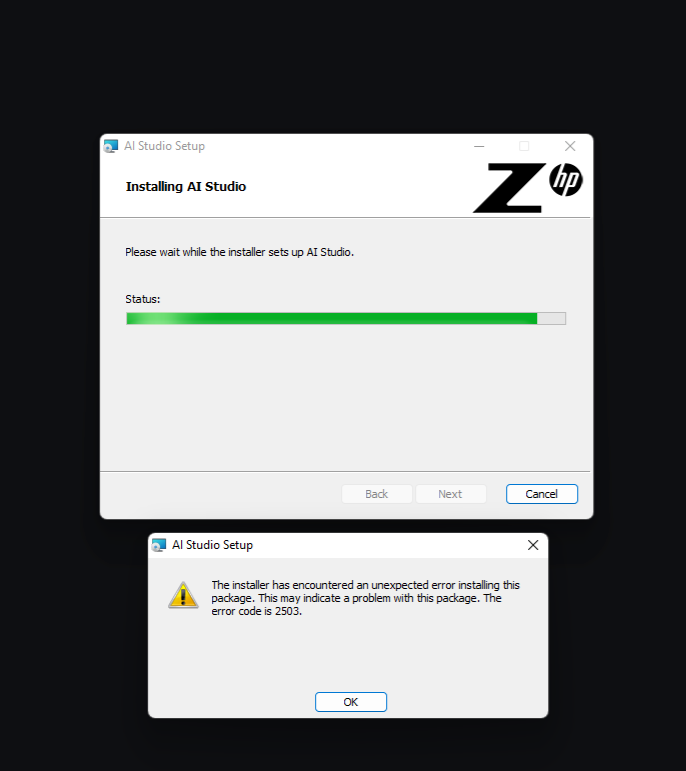
I was hoping to get some context for two error codes (2503, 2502) when trying to install AI Studio. Please advise. Thank you for your time.

Best answer by suresh.ramanan

@truzech  could you pls email the two files I requested for to aistudiosupport@hp.com?

#1 installation log at %TEMP% - filename will be AIStudio_<timestamp>.txt
#2 phoenix.log file at %localappdata%/HP/AIStudio, if available

14 replies

Forum|alt.badge.img

Hi truzech!

Could you please provide a screenshot of this error message?

At which point in the installation process do you see this error?

Thank you.

-Suresh


Forum|alt.badge.img+1
  • Author
  • Contributor
  • May 17, 2025


Forum|alt.badge.img+1
  • Author
  • Contributor
  • May 17, 2025

@suresh.ramanan thank you for your reply, by the way.


Forum|alt.badge.img+1
  • Author
  • Contributor
  • May 17, 2025

for more context this error appears after activation, via the live and EAP versions of the installer


Forum|alt.badge.img

@truzech please redownload the installer from https://zdocs.datascience.hp.com/downloads
you should be downloading version 1.45.6
please reattempt the installation process with this lates download

if the issue persists please email the following two files to aistudiosupport@hp.com

#1 installation log at %TEMP% - filename will be AIStudio_<timestamp>.txt
#2 phoenix.log file at %localappdata%/HP/AIStudio, if available

thanks!


Forum|alt.badge.img

Hi ​@truzech just checking in, did you get a chance to try the installation from a new download?


Forum|alt.badge.img+1
  • Author
  • Contributor
  • May 20, 2025

I’ve already previously tried this version. Nothing has changed.


Forum|alt.badge.img

@truzech  could you pls email the two files I requested for to aistudiosupport@hp.com?

#1 installation log at %TEMP% - filename will be AIStudio_<timestamp>.txt
#2 phoenix.log file at %localappdata%/HP/AIStudio, if available


Forum|alt.badge.img

@truzech I learnt that this is more of an error thrown by the windows installer service
I found some useful solutions online
 

Solution 1: Modify permissions to C:\Windows\Temp folder

Go to Local Disc (C:) and open the Windows folder.
Find the Temp folder and right-click on it.
Go to Properties >>> Security tab >>> Advanced.
Click on your Windows user and change the permission to Full control.
Click Apply.
If you receive warning messages, click Yes and continue.

Here is a video that explains this process (1) How to fix error code 2503 and 2502 in windows 10 - YouTube

Solution 2: From Microsoft Answers
Error 2503 and 2502 installing/uninstalling - Microsoft Community

I hope this helps you proceed with the installation successfully. Cheers!


Forum|alt.badge.img+1
  • Author
  • Contributor
  • May 21, 2025

@suresh.ramanan 

You may be onto something. I actually got a similar type of error when trying to install something completely unrelated. Will investigate.


Forum|alt.badge.img

@truzech did that help address the issue?


Forum|alt.badge.img+1
  • Author
  • Contributor
  • May 22, 2025

it turned out to be a cascading number of problems which was preventing my version of windows 11 from being updated correctly. had to dig around the bios a bit, but it appears to have been resolved. appreciate you walking through this this with me.


Forum|alt.badge.img

wow thats fantastic! if you could summarize a few pointers that you found useful, please post them here. I am sure the community will benefit greatly from your experience! Cheers!


Forum|alt.badge.img+1
  • Author
  • Contributor
  • May 22, 2025

sure! somehow my bios ended up running in legacy mode; probably when i was messing around trying to dual boot linux a bunch of years ago, and never got switched back. when windows 11 version 21H2 went out of service last year it began to require TPM and Safeboot to update further, which is not possible in legacy mode so my system was perpetually stuck in november 2024, and was actually causing a lot more havoc than i actually realized.

moral of the story, take notes if you're gonna willingly mess up with your bios settings.