


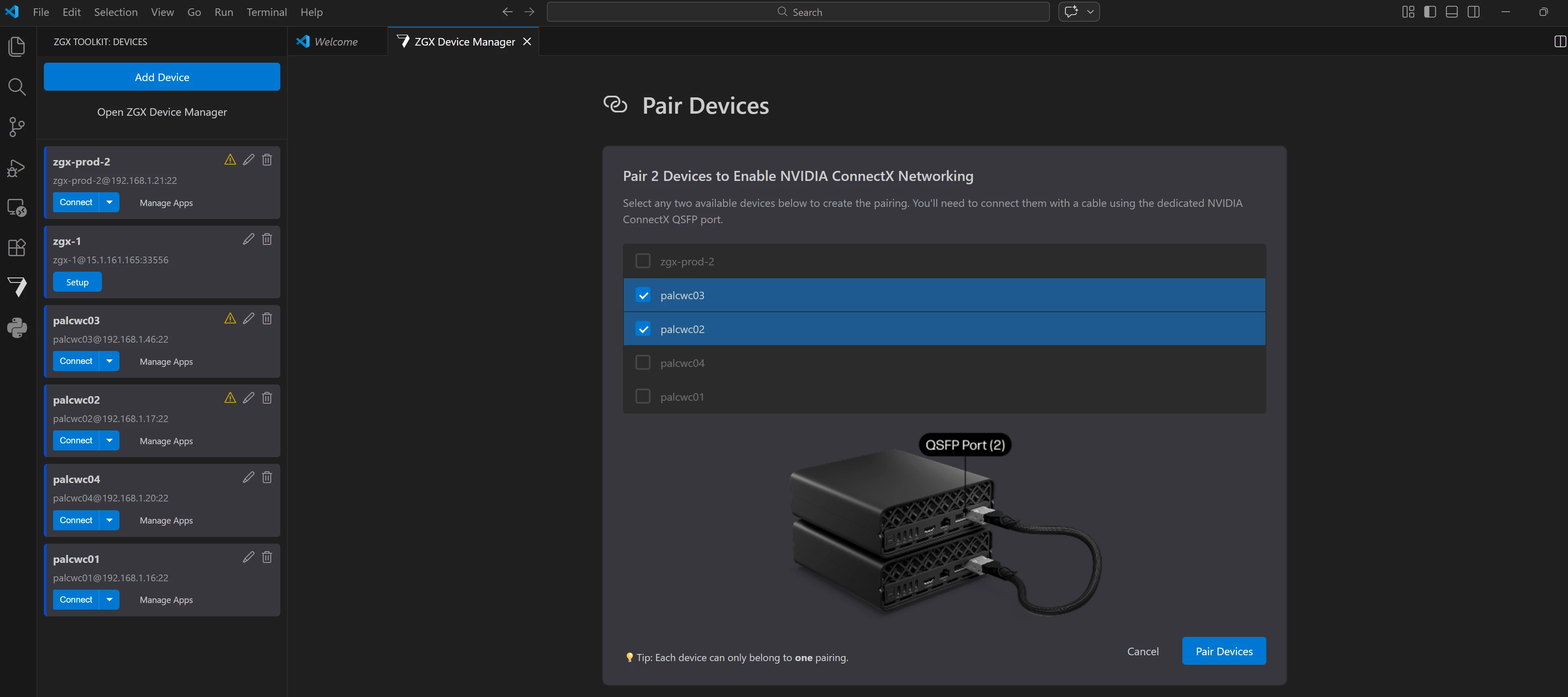


HP released v1.21.1 of the ZGX Toolkit VS Code Extension (AKA: ZTK).
What's New
This release introduces ConnectX device pairing, enabling two ZGX Nano devices to be linked together for highperformance networking over ConnectX NICs—all managed directly from VS Code. The release also includes bug fixes and UX and RAG template improvements. It also delivers UX polish, a more capable RAG sample, and a collection of bug fixes.
Major Features
ConnectX Device Pairing
You can now pair two ZGX Nano devices to form a high bandwidth ConnectX network link. Once two devices are physically connected using a QSFP cable, the ZTK extension helps with a clean UI for everything else. The entire pairing workflow—selecting devices, entering credentials, configuring NICs, and monitoring the result—is handled within the extension.
What's included:
- ConnectX NIC Configuration – SSHbased configuration and unconfiguration of ConnectX NICs is wired into the group service, with centralized SSH connection utilities shared across the application.
- Pair Devices View – A dedicated view and controller guide the user through selecting two devices, entering the sudo password, and completing ConnectX pairing. Error paths include overlay messaging and group/NIC rollback on failure.
- Pairing Details View – Shows the ConnectX network interfaces and their assigned IP addresses for each device in the pair. Accessible via a "Show Pairing Details" command palette entry.
- Unpair Devices View – A dedicated view to list the devices in a pair, collect the sudo password, unconfigure the ConnectX NICs, and remove the group. The existing unpair command now delegates to this new view.
- Sidebar Pairing Integration – The sidebar device list now separates devices into "Paired" and "Unpaired" collapsible sections. Paired devices are grouped in expandable pair containers that include Pair Details and Unpair action buttons.
- Device Manager Pairing Integration – Pair containers with Pairing Details and Unpair Devices buttons are surfaced in the Device Manager. Attempting to delete a paired device shows a warning overlay, prompts for the sudo password, and proceeds with unpairing before deletion.
Getting started:
- With two ZGX Nanos connected with a QSFP cable on the same network as your remote device with the ZTK extension
- Open the Device Manager or the sidebar device list
- Select two set up ZGX devices and click Pair Devices
- Enter the sudo password when prompted; the extension will configure ConnectX and report the result
- Use the Pair Details button to inspect ConnectX IP addresses, or Unpair to remove the link
RAG Sample: Sample Questions
The RAG quick start sample now ships with predefined sample questions. This makes it faster to explore the application's capabilities and understand RAG workflows on your ZGX device without having to craft your own queries first.
Other Changes
Small bug fixes and improvements.
The toolkit is free and can be installed directly from the VS Code Marketplace. Check out this 1 min video to see how.
For more information, visit www.hp.com/zgx-onbard.